iOS · Android

Watch it together. Log it once.

TRLR Track · Rate · List · Review

One person logs the episode and the whole group moves forward — nobody sits there ticking boxes on their own. The rating sheet comes up while it's still fresh, and the thread's already waiting. Movies and TV, down to the episode, one diary.

Free to sign up. Tracking, groups and the community are free forever.

TRLR home screen — your watchlist with a hero card and one-tap marking
How it works

Mark it. Rate it. Say something.

Three beats, and only the first one is required. TRLR is built so that logging what you watched costs a single tap — and so the interesting part happens right after, while the episode is still in your head.

01

One tap to mark

Swipe a row or hit the hero button. Never a form, never a required review. Mark a single episode, a whole season, or a movie you just walked out of.

02

Rate it while it's fresh

The rating sheet comes up right after — 0.0 to 5.0 in tenths, because "somewhere between a 3 and a 4" is a real opinion. Skippable every time.

03
💬

Then find your people

React, drop a quote, or open the thread and find everyone who just finished it too. This is the part TRLR is really for.

1
Tap to mark an episode watched. Reviews stay optional, forever
0.1
Rating precision — decimals on shows, episodes and movies
2
Native apps — iOS and Android, one account
2
One-tap importers, so your history arrives with you
What's inside

A real tracker with a room attached.

Everything below is built and working — these are real screens from the app, not mockups. If you want to know what's still in flight, the FAQ says so plainly.

Track it properly — shows and movies

One catalog, one history. Per-episode state that survives contact with real life: gaps, rewatches, the show you abandoned in season 3 and picked back up two years later.

  • One-tap marking — swipe a row or hit the hero button. Never a form.
  • Decimal ratings — 0.0–5.0 in 0.1 steps, on shows, episodes and movies. Drag the bar to the exact number you mean.
  • Real statuses — Plan · Watching · On hold · Dropped · Finished · Rewatching. Dropped shows get out of your way.
  • Per-episode truth — mark any episode, gaps allowed, no phantom autofill. Or "Mark Season 3" in one go.
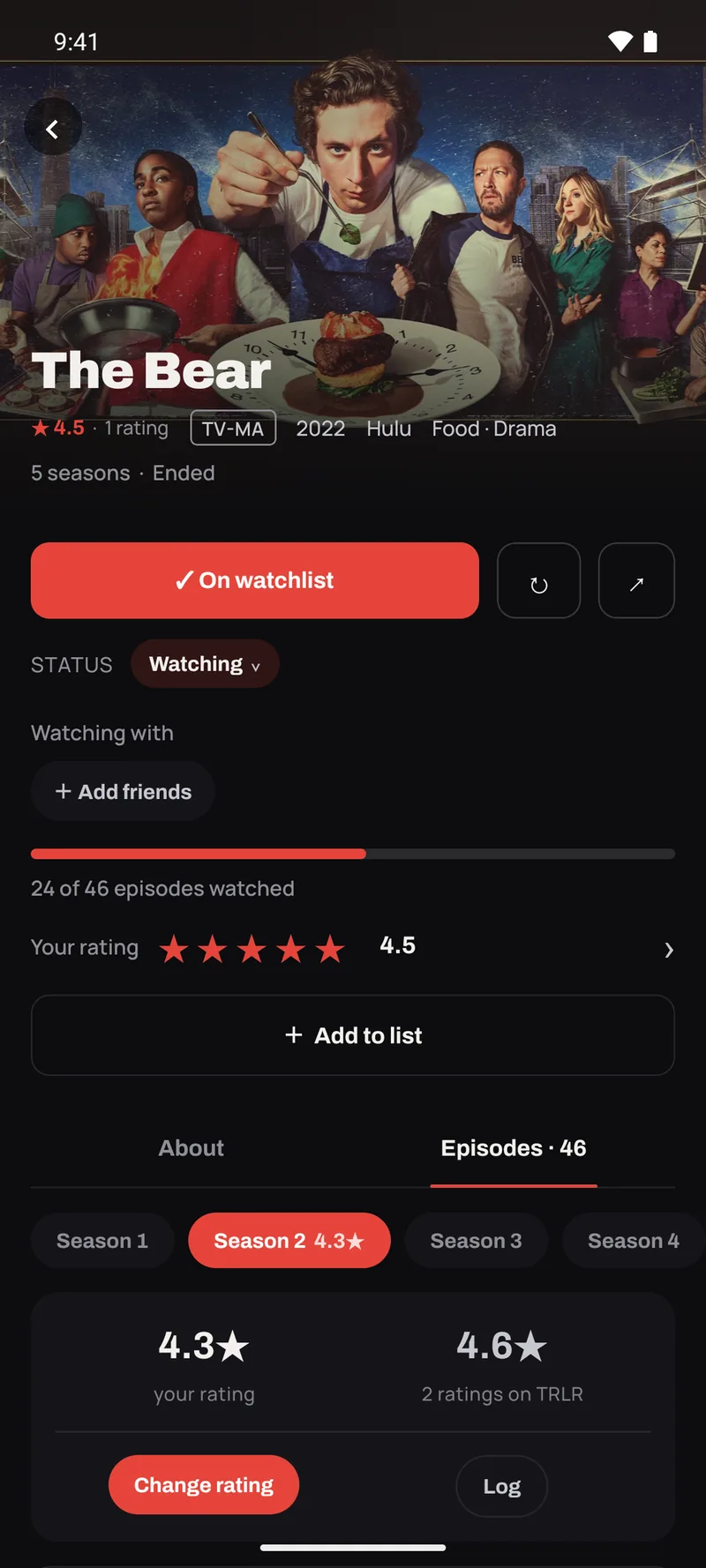
  • Rate and review a season, not just a show — because season 2 dipped and season 4 was a return to form, and one number for nine years can't say that. Each season carries its own score, right on the chip.
  • Rewatches don't erase history — start again without losing the first time through.
  • Hide ratings until you've watched — flip one setting and community scores stay masked until you mark it. Spoiler-safe by default.
PlanWatchingOn hold DroppedFinishedRewatching
A show's page — status, per-episode progress, season chips carrying your rating, and a decimal rating

Groups that actually watch together

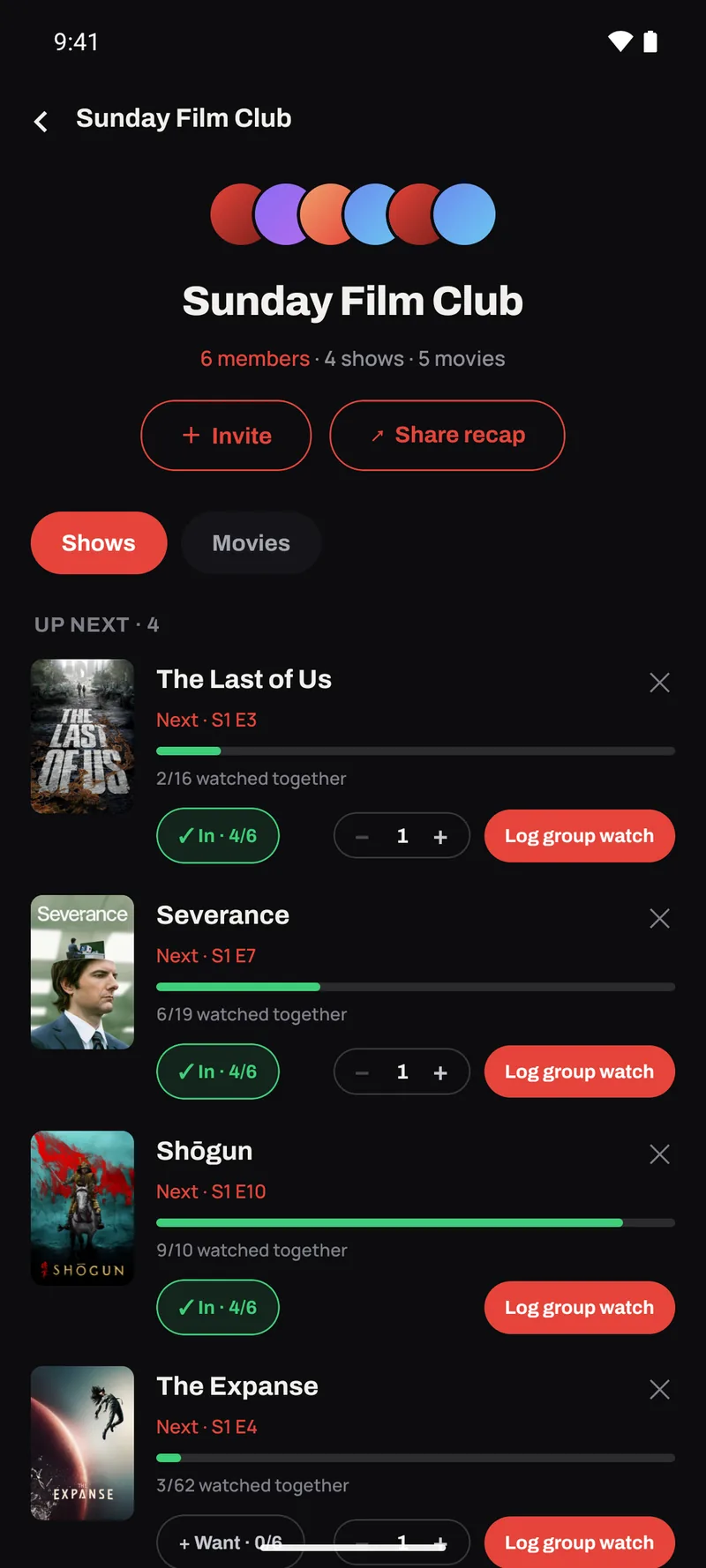
A group in TRLR isn't a chat room bolted to a tracker. It's a shared shelf, a shared queue and a shared log — so the four of you watching the same show stay on the same page without anyone doing the admin.

  • Log once, everyone advances — mark an episode for the group and it fans out to every member's own progress. Nobody gets rewound, nobody double-logs.
  • Group-owned lists — the whole group adds to it, and it stays with the group rather than one person's account.
  • What the group is watching — shows and movies in flight, with everyone's position, in one view.
  • Bring your own people — invite friends into a group; groups can hold shows and movies side by side.
A TRLR group — six members, four shows in flight, each with the group's shared progress

Comments, reactions, and people who just watched it too

Finish an episode and find the thread already going. The community layer is free forever, in every plan — a room only works if everyone's allowed in it.

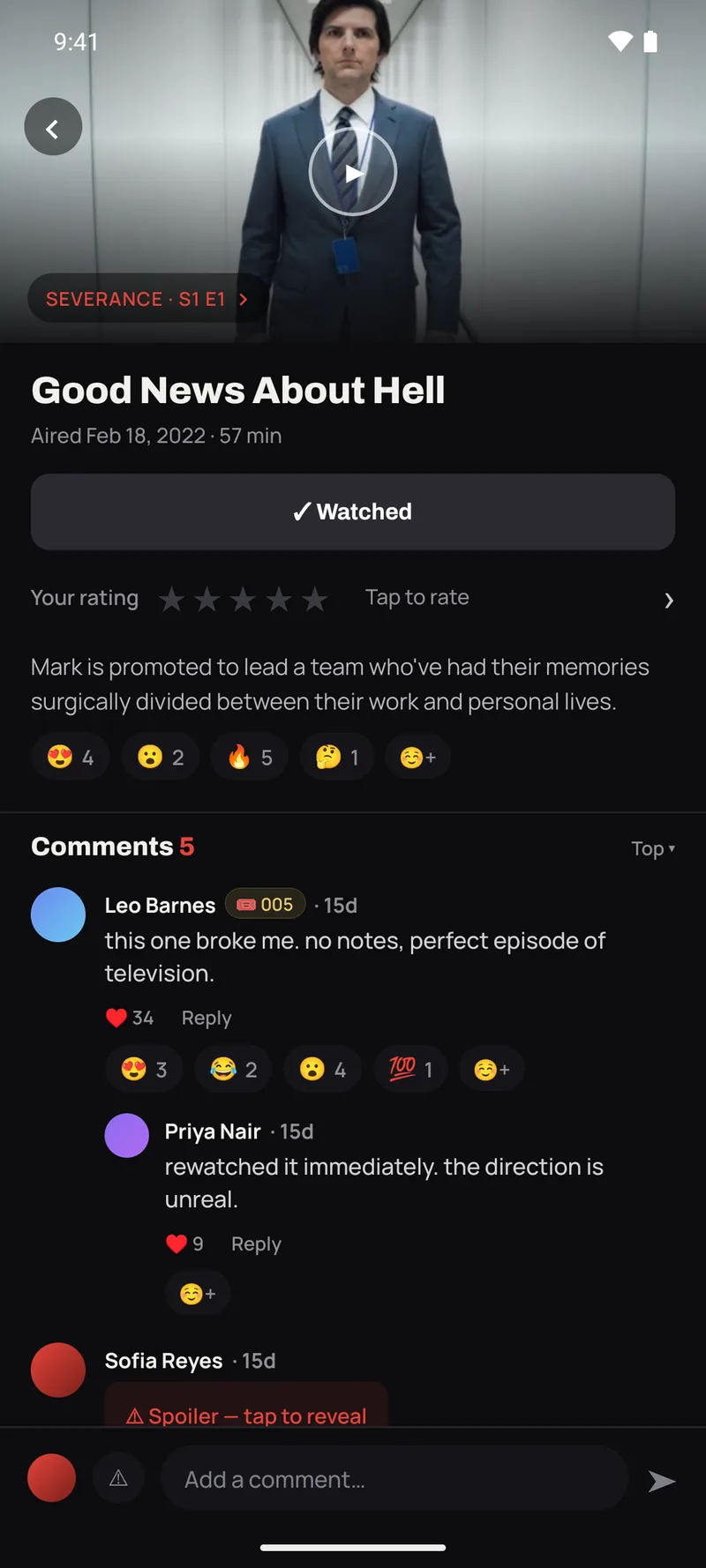
  • Community comments — threaded replies and likes on any episode, with a spoiler toggle that genuinely hides the text until you tap it.
  • Emoji reactions — a curated set on any episode, comment or quote. One tap, no keyboard.
  • Friends + activity feed — request and accept, then watch what your people are watching.
  • Mark → rate → say something — the rating sheet hands you straight to the thread. Skippable every time.
😍😂😮 😢😱🔥 🤔💯
An episode thread — emoji reactions, threaded replies and a spoiler still masked

Notable quotes, kept by the people who love them

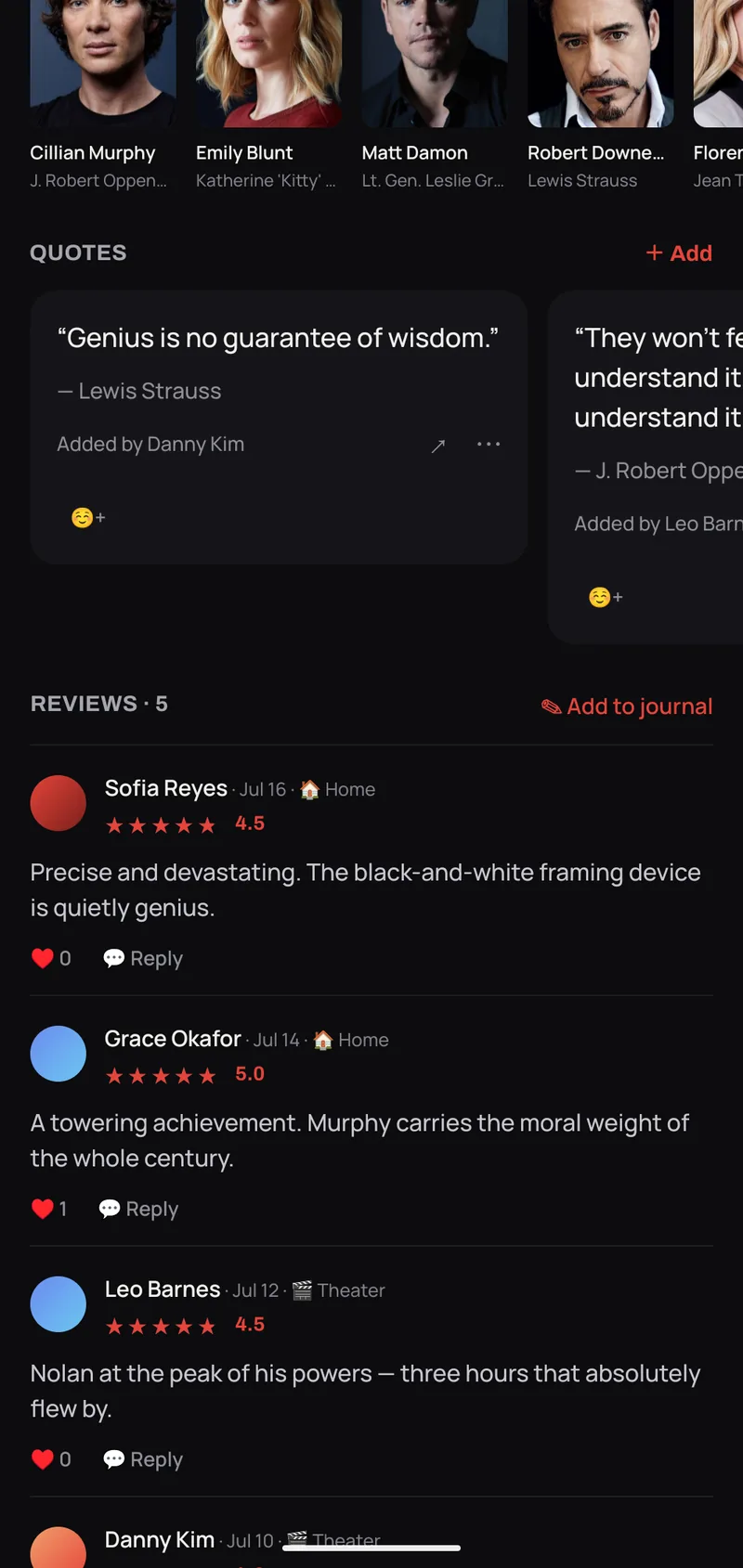
The line everyone repeats belongs on the film's page, not lost in a thread. Quotes are a community layer on every movie and show — add one, attribute it to the actor who said it, and it turns into a card worth sending to someone.

  • Add a quote in seconds — pick the line, pick the cast member from a searchable list, flag it as a spoiler if it gives something away.
  • Attributed to the performer — quotes surface on the actor's page too, so you can scroll a career by its best lines.
  • React and rank — the same emoji reactions apply, and Top / Newest sorting keeps the good ones on top.
  • Shareable quote cards — render any quote as an image card and send it straight out of the app.
Quotes carousel on a film's page

Lists you can hold up against someone else's

The curation layer sits on top of tracking rather than replacing it — so a list is something you make and use, not somewhere your data goes to sit.

  • Lists worth keeping — drag to reorder, add a note to any entry, pin the ones you actually use.
  • Private, friends-only, or public — per list, your call.
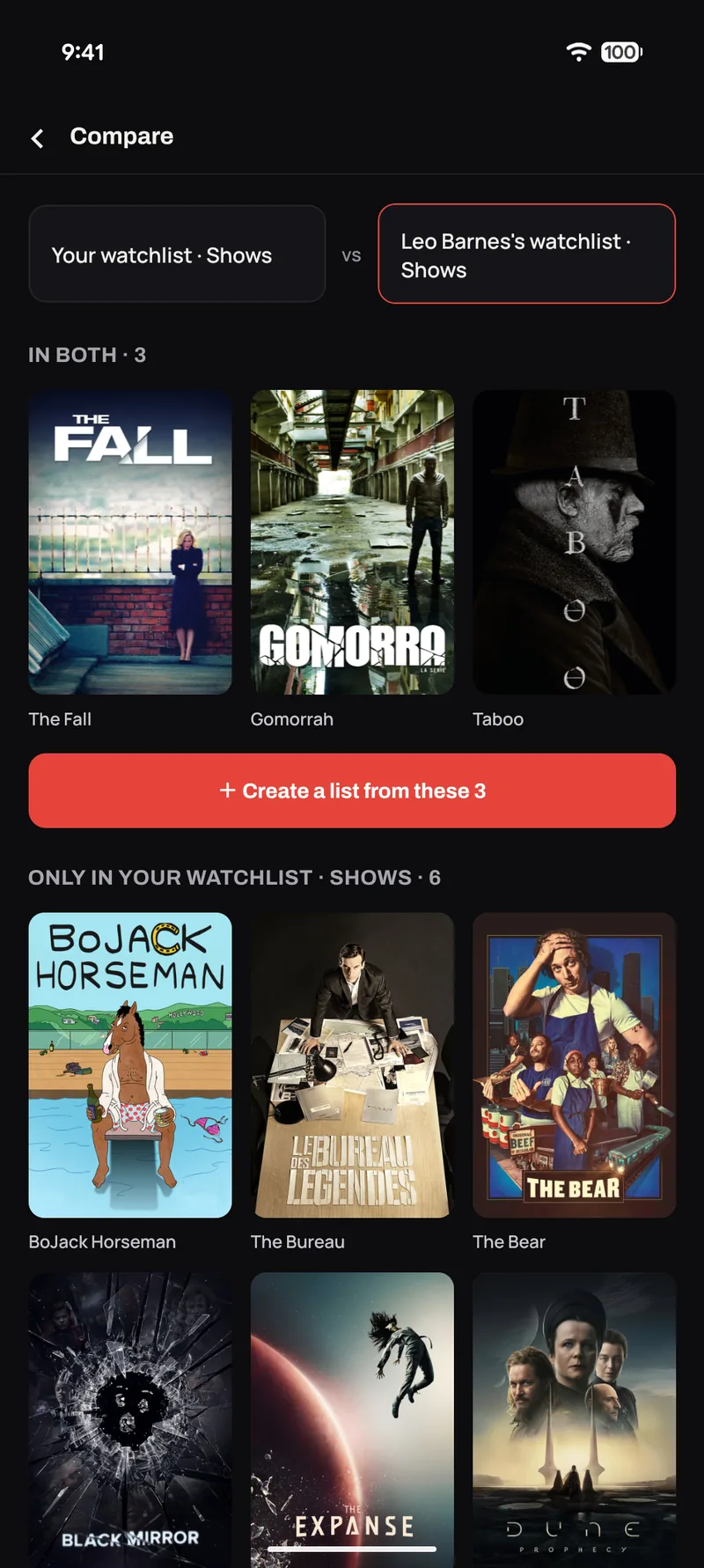
  • Compare against a friend — put your list next to theirs and see it split three ways: in both, only yours, only theirs.
  • Turn the overlap into a new list — one tap from a comparison to a shared list of everything you both want to watch. The shortlist builds itself.
Comparing two lists — in both, only yours, only theirs

Nobody can decide. Fine.

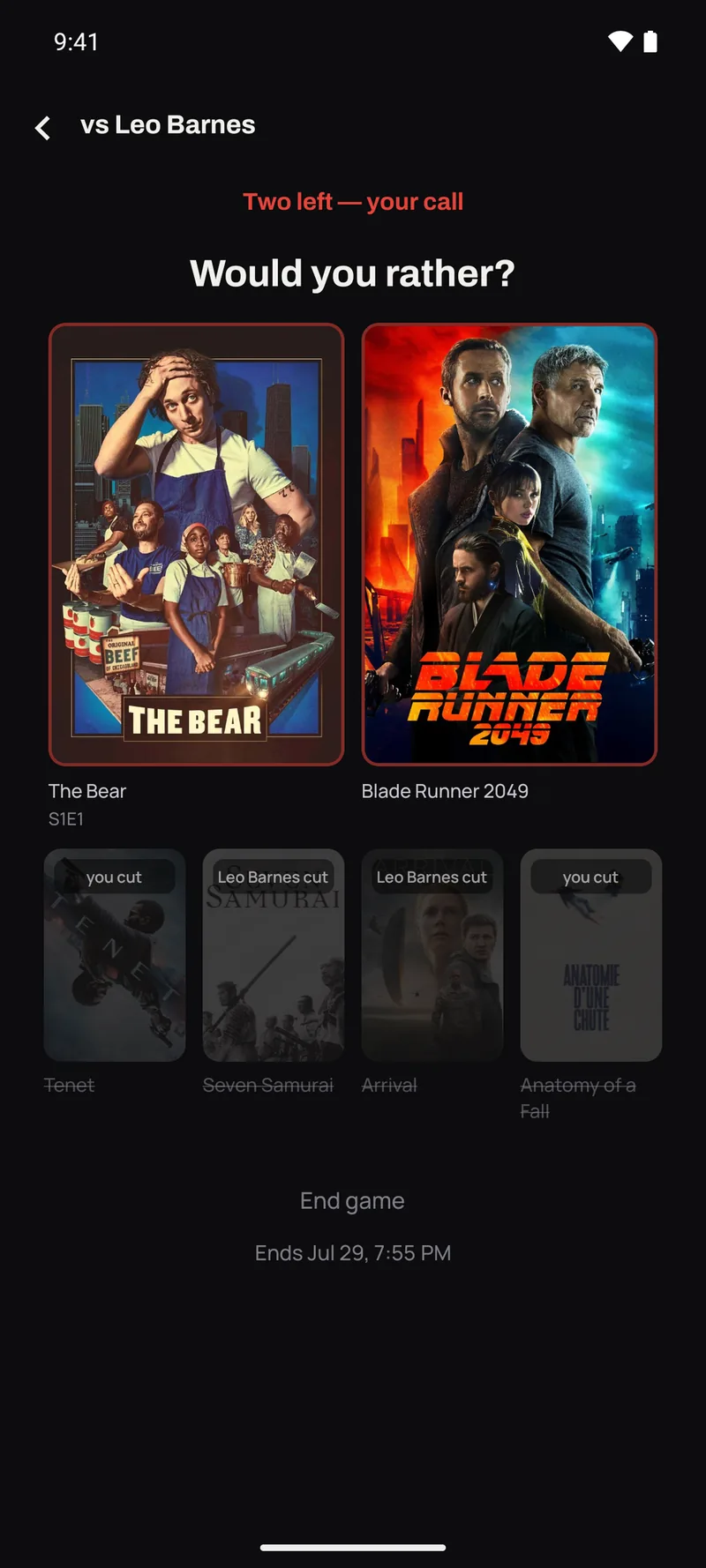
Six films and shows, side by side. You each cut one until two are left, and whoever didn't make the last cut picks the winner. It takes about a minute and nobody has to be diplomatic about it.

  • Built from what you've both saved — the shortlist comes out of both your want-lists, with the ones you already agree on first. Things you'd picked out anyway, not suggestions from nowhere.
  • Six by default, eight for a longer game — an even pool either way, so the cuts come out level.
  • Shows turn up ready to play — a series enters as the next episode you'd actually put on, taken from whichever of you is further behind. Nobody gets spoiled.
  • Neither of you can rig it — one of you shapes the final two, the other one chooses between them.
  • One game at a time per friend — as many as you like with different people. Set it to expire tonight, or leave it running. Picking something never logs it for you.
A Would You Rather game at two left — The Bear and Blade Runner 2049 still standing, four cut titles greyed out below

A diary that remembers the whole night

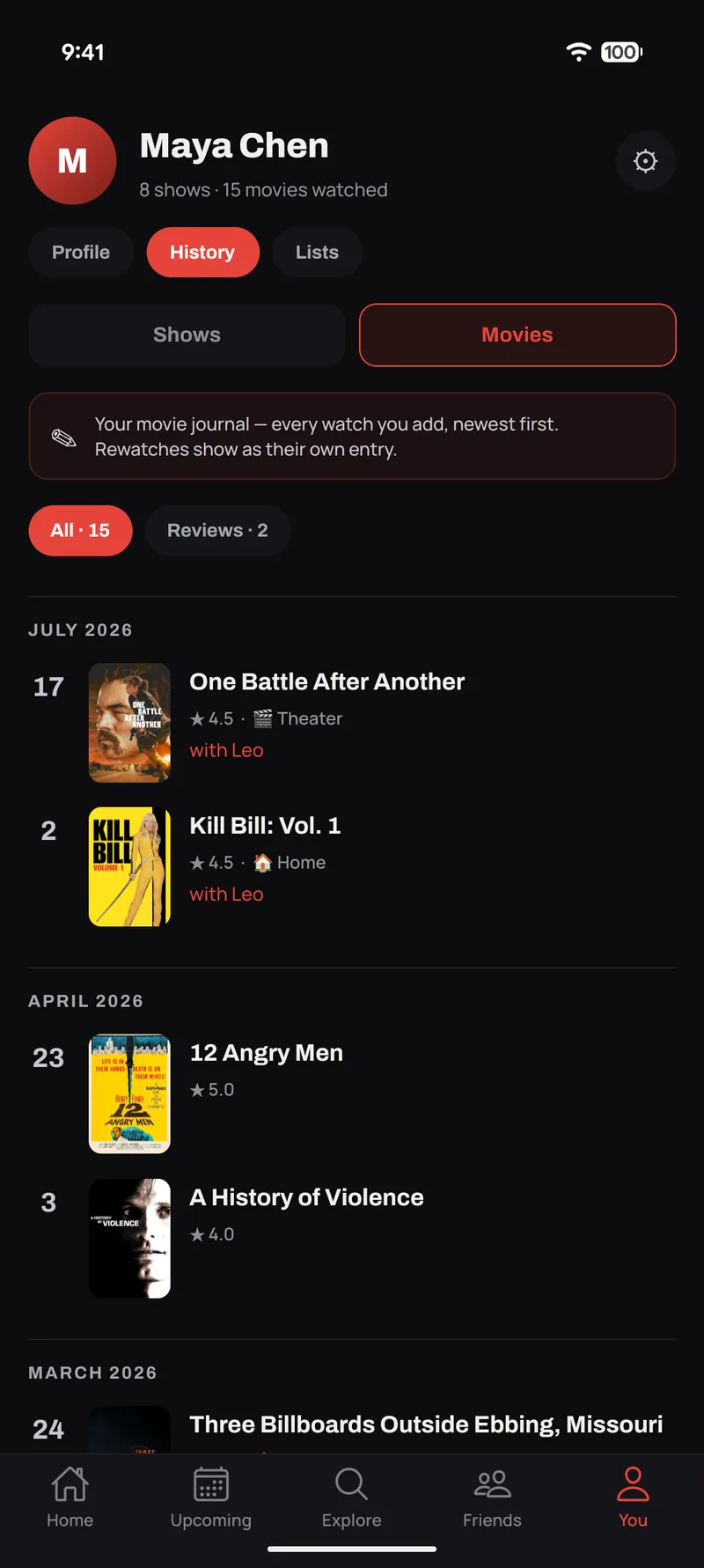
Every watch is its own entry with its own frozen rating — bumping a film to 4★ today doesn't rewrite what you thought about it in 2019. And an entry can hold more than a score. Shows and seasons keep the same kind of history, not a single number you overwrite.

  • Where you watched it — home, a theater, a plane, a festival. The 2am cinema screening deserves to be remembered as one.
  • Who you watched it with — tag the people on the couch. Frozen at mark time, so your history stays true even if the friendship graph changes later.
  • Reviews with discussion — write it up properly, get likes and replies on the review itself.
  • Rewatch-aware — the third viewing is its own entry, not an edit of the first.
  • Television keeps one too — episodes you watched grouped by day, with every season you rated or wrote up threaded through the same timeline.
🏠 Home🎬 Theater✈️ Plane 🎪 Festival📍 Other
Film diary — one entry per watch

What's coming, and where the hours went

The front of the app tells you what's next; the back of it tells you who you've been. Both are real screens with real data, not a once-a-year teaser.

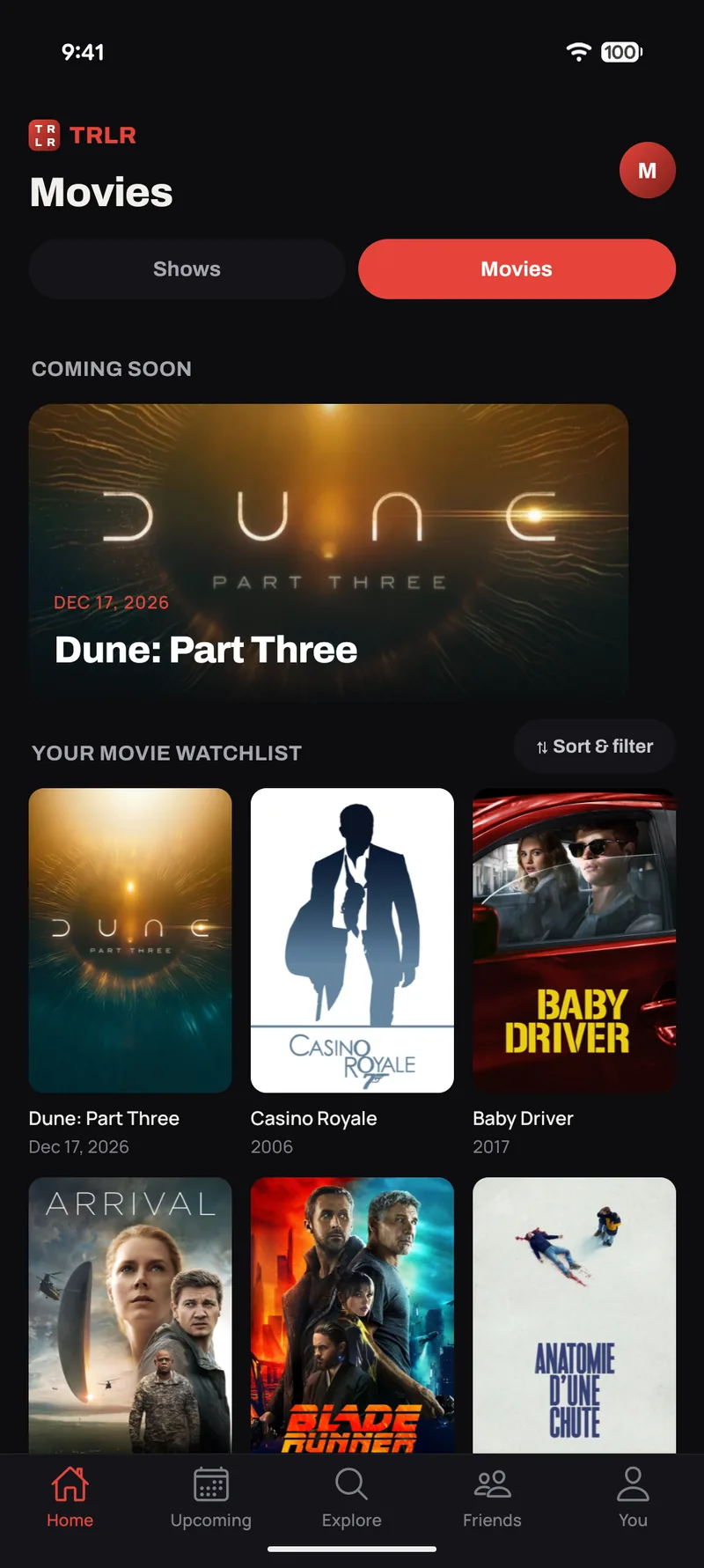
  • Coming soon carousel — upcoming releases on your home screen, swipeable, counting down from "in 12 days" to "Out now".
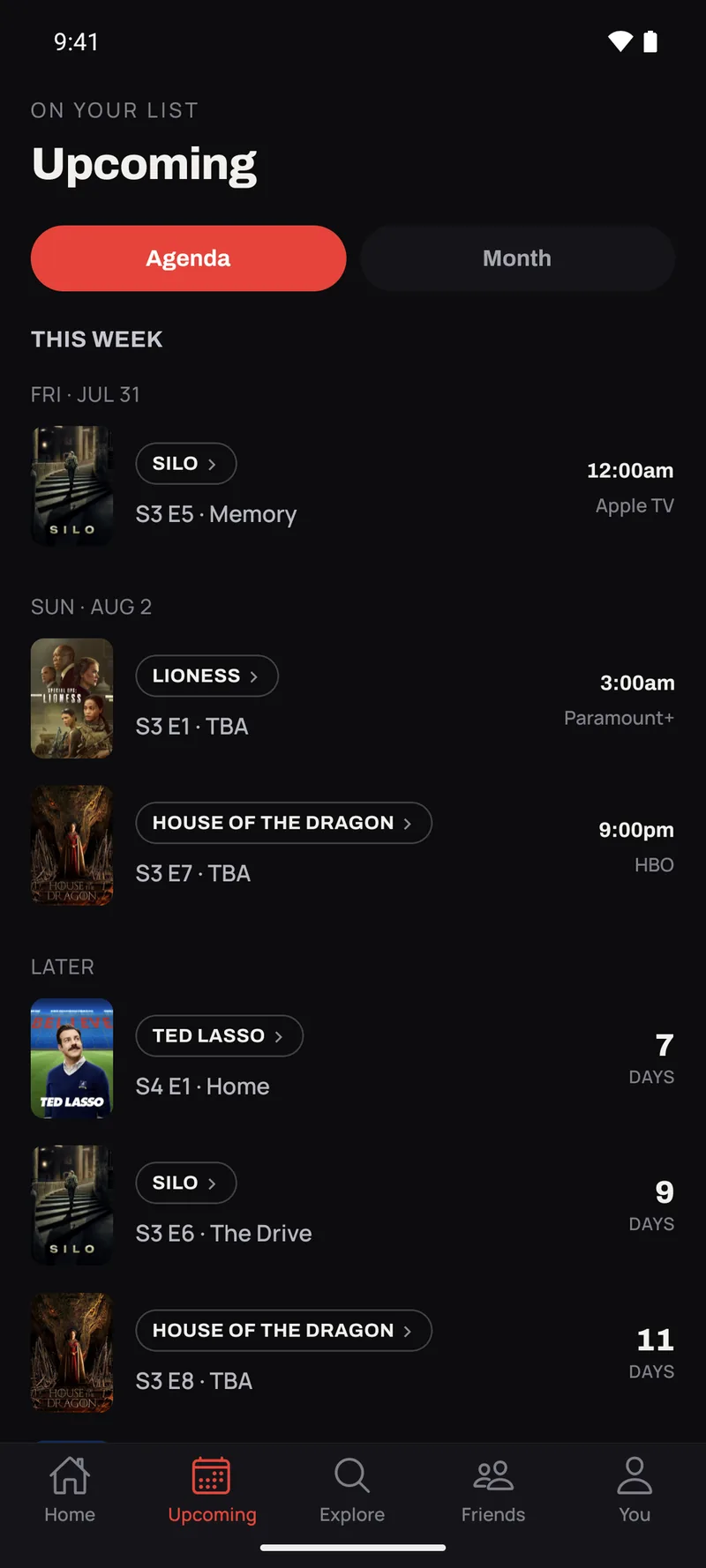
  • An upcoming calendar — episodes and movie releases merged into one agenda, with broadcast time and network.
  • Follow cast and crew — follow an actor or a director and get told when they've got something new coming out.
  • Cast & crew pages — bio, quotes and filmography grouped by role, reachable from any cast photo or "Directed by" credit.
  • Lifetime stats by default — episodes, movies, hours and shows finished, each annotated with how much was this year.
  • Every number is a door — tap any count to drill into a sortable, filterable grid of exactly those titles.
The upcoming calendar in Agenda view — episodes by air date, with broadcast time and network, and a Month toggle

Bring your history with you

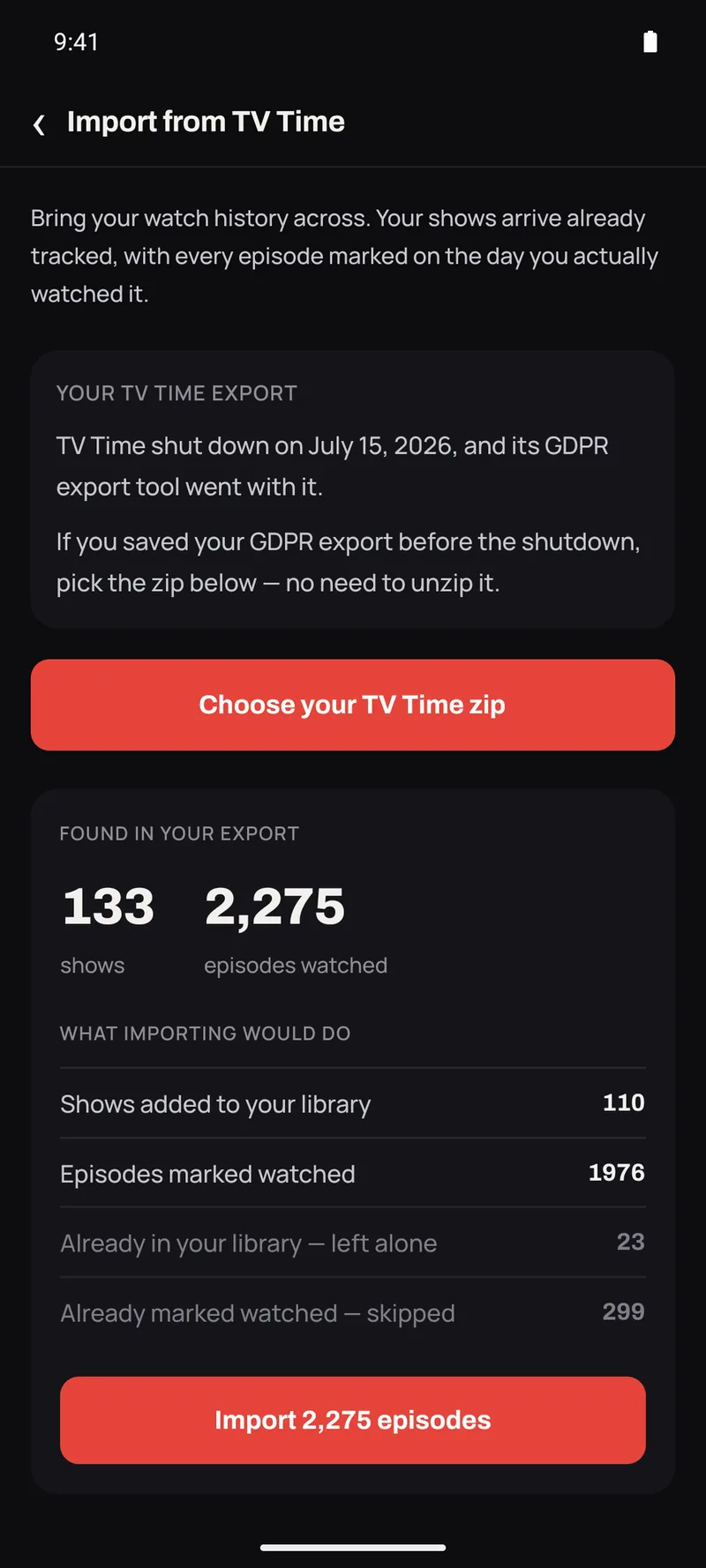
Two importers, both built and tested against real exports. Point TRLR at the file you already have and your library lands with its dates intact.

  • TV Time import — TV Time shut down in July 2026, but your history doesn't have to go with it: if you saved your GDPR data export, TRLR reads that exact zip, resolving your shows by catalog ID rather than guessing at titles — no confirmation screen full of wrong matches.
  • Letterboxd import — drop in the zip and it reads your watched films, your diary entries with their original dates, your ratings and your watchlist.
  • Your dates survive — history is backdated to when you actually watched it, so your stats and your diary are right the moment you land.
  • Big libraries are fine — imports run chunked and resumable, and pull in titles our catalog has never seen before.
  • We tell you what didn't come across — the summary at the end is specific about anything a source file didn't carry, rather than quietly dropping it.
A TV Time GDPR export read back — 133 shows and 2,275 episodes, and what importing would do
We listen

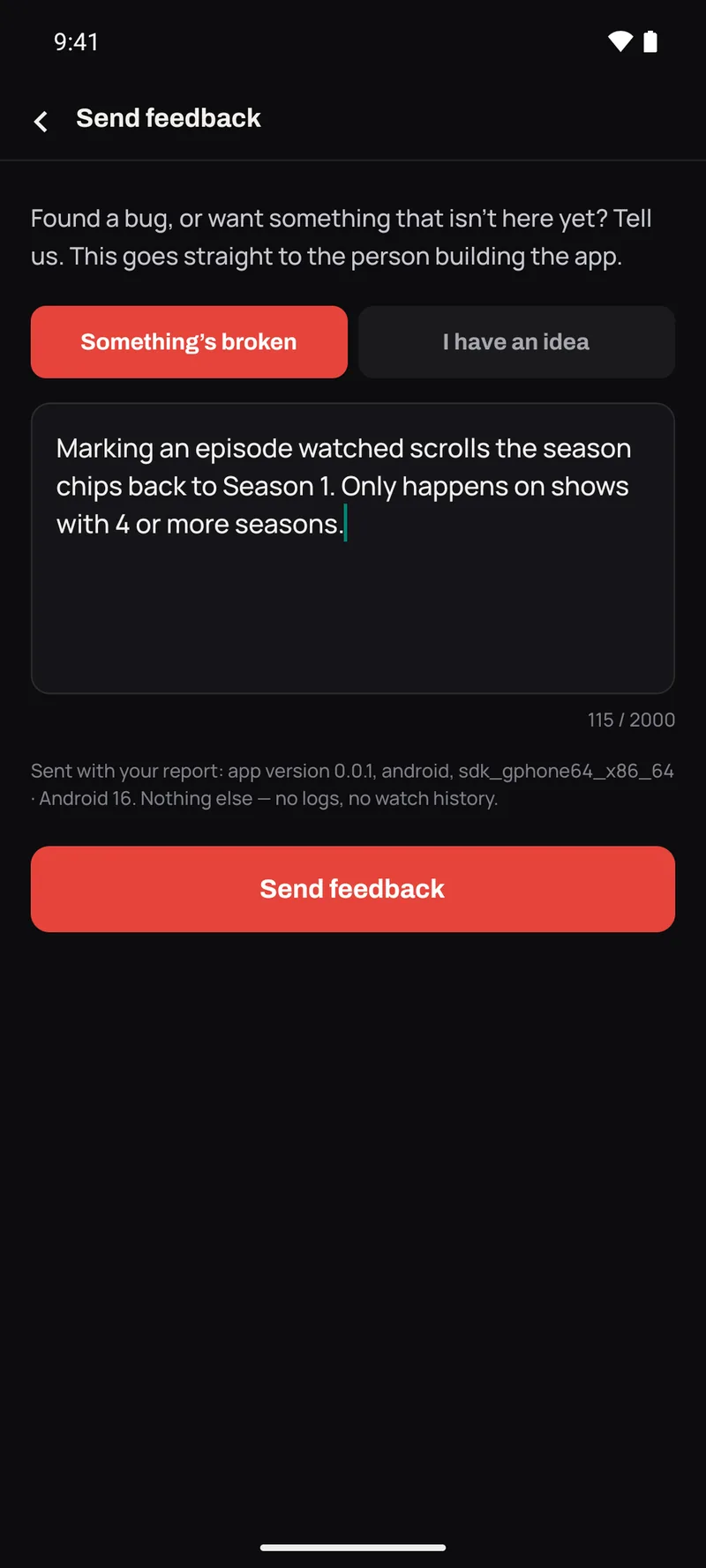
Your bug report goes to the person who'll fix it.

There's no ticket queue and no support-bot in between. Report a bug or ask for a feature from inside the app, and it lands directly with the people building TRLR — usually the same day, often with a reply.

Report it from where it happened

Bug reports and feature requests are built into the app — no email, no forum account, no screenshot-and-hope.

It reaches us directly

Every report arrives in our console with the context attached, so we're not asking you to reproduce it from memory.

Argue with what's next

What we're building next is on a public board — including the things we've said no to, and why. The Discord is where it gets challenged. A good few of the features on this page started as somebody's complaint.

Join the Discord See what we're working on
The in-app bug report — bug or idea, and exactly what gets sent with it
Our promises

The lines we won't cross

Three commitments that shape every decision about what ships and what gets charged for. If we break one of these, hold us to it.

Promise 01

Logging never costs more than a tap

You'll never be made to write a review, pick a favourite character or fill in a form just to mark something watched. Marking is one tap. Everything after it is optional, and always will be.

Promise 02

Tracking and reach are never paywalled

Your history, your statuses, your lists, comments, quotes, friends and groups stay free. We charge for flair and for looking back at yourself — never for using the app or being seen in it.

Promise 03

Speed is a feature

A slow screen is a bug, not a fact of life. TRLR is native on both platforms, and we treat every stutter as something to go and fix.

Pricing

Free is the whole product.

Everything that makes TRLR work — the tracking, the groups, the room — is free and stays free. Plus sells reflection, flair and power tools: the things you'd enjoy having, not the things you need to use the app.

Free
$0 / forever
The whole app. Not a trial.
  • All tracking — shows, movies, every status, decimal ratings
  • Comments, threads, spoilers and likes
  • Emoji reactions
  • Quotes — add, react, share the card
  • Friends, activity feed, groups + group-watch
  • Lists, compare and build-from-overlap
  • Would You Rather — settle it in about a minute
  • Film diary + reviews, with where and who
  • Lifetime stats and ratings curves
  • TV Time and Letterboxd imports
  • Both platforms — iOS and Android
Get TRLR free
TRLR Plus Not yet available
$14.99 / year
Nothing is charged today.
  • TRLR Wrapped — your year in film & TV, deep-dived
  • Per-list stats — decades, genres, runtimes and people, for any list
  • Saved filters & smart lists — save any filter set, reuse it anywhere
  • Themes — recolor the whole app
  • Premium quote-card themes
  • 20 profile favorites, up from five
  • Early access to new features
Follow along in the Discord
Questions

Fair things to ask

Can I bring my existing history across?

Yes — TRLR imports from both TV Time and Letterboxd, and both importers are built and tested against real export files. TV Time shut down in July 2026 and deleted its users' data with it — but if you downloaded your GDPR export before the end, that zip is exactly what TRLR reads, as it arrived, no unzipping. Your shows and films resolve by catalog ID rather than by guessed titles, and your original watch dates are preserved, so your diary and your stats are right the moment you land. Whatever a source file doesn't contain, the import summary tells you about explicitly rather than dropping it silently.

What's still in flight?

A few things, and we'd rather you hear them from us. Where to watch currently links out to a region-aware search rather than showing provider logos in the app; that data is licensed and expensive, and it arrives when the app can pay for it. TRLR Plus is built — Wrapped, themes, smart lists, per-list stats — and goes on sale once the app stores approve the subscription; nothing is charged today. GIF reactions are on hold: the API we planned to use shut down, and we'd rather say so than leave it listed as coming. And we'd like to support more import sources than TV Time and Letterboxd, but we're not putting a date on it.

Can I get my data back out?

Yes — one tap in Settings exports your whole history, ratings, lists and reviews as a file that's yours to keep, and it stays free. You can also delete your account and all its data from inside the app, whenever you want.

Which platforms can I use it on?

iOS and Android, on one account, and both are native. We build for the phone in your hand while you're actually watching something, and that focus is what lets the app feel the way it does.

What's actually free?

All of the tracking, all of the community. Statuses, decimal ratings, per-episode history, the diary, reviews, comments, reactions, quotes, friends, groups, group-watch, lists and list comparison, lifetime stats, and both importers. Plus is for reflection and flair — Wrapped, app themes, premium quote-card themes, saved filters and smart lists, per-list stats, and a bigger favorites strip. Lists are not capped on either tier and won't be.

How do I report a bug or ask for a feature?

From inside the app — bug reports and feature requests are a built-in screen, not an email address. They come straight to us with the context attached. The Discord is the other door, and it's where what we build next gets argued about. A good number of the features on this page exist because somebody asked for them there.

Where does the show and film data come from?

TheTVDB, a community-maintained catalog covering both television and film — which is why episode data goes as deep as it does, and why imports line up so precisely.

Will the free tier get worse once you have users?

The free tier is the product. A social app whose community is paywalled has nothing left to be social about. Plus is aimed squarely at reflection and flair — your Wrapped, your themes. We considered capping lists and rejected it: you'd hit the wall the moment you imported a library, which is the worst possible time to meet a paywall. If we ever move tracking or reach behind the paywall, we've broken the promise this page is built on.
Watching is better with the room.

Get TRLR on your phone, bring your history with you, and pull the people you actually watch things with into a group.

Building something with us? Join the Discord — that's where the roadmap lives and where feature requests get argued about.

⚠ Draft: store links not set. Fill IOS_URL and ANDROID_URL at the foot of index-v2.html and every button picks them up.